Rankform
Tools/Finance & administration

Expenses from receipt to payout. No spreadsheets, no chasing.

Expenses & Reimbursements collects your team’s receipts, checks every expense against company policy, routes it through your approval structure and pays people back in one payout, in any currency.

14 days freeNo card requiredOne team across all tools
Price €2.00 per person per month, every feature included What the price includes
1 photoof the receipt is enough to submit an expense, from a phone or in Telegram
1 clickapproves every expense that is within policy
Any currencyat the ECB or NBU rate on the expense date
1 filefor the whole payout: SEPA for the bank or an Excel register
3 languagesUkrainian, English and Dutch, set per person
For everyone involved

One expense, three people who care about it.

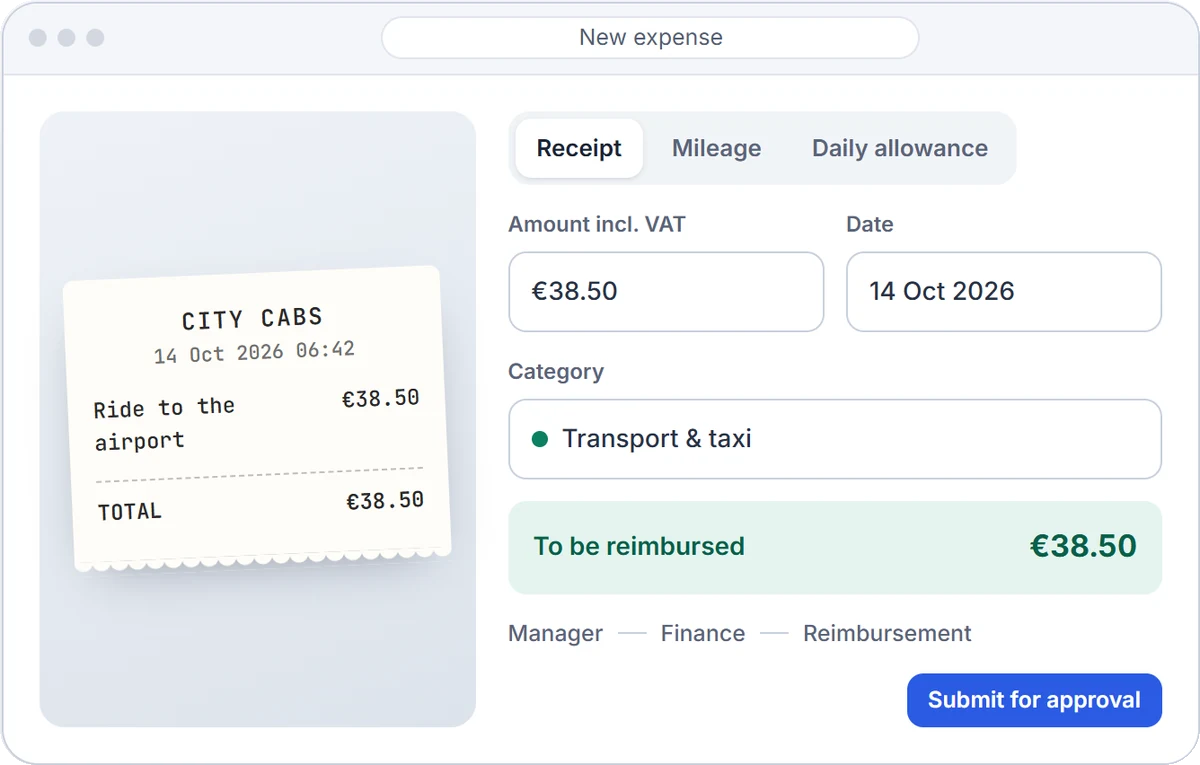
The employee wants their money back. The manager wants to know what they are approving. Finance wants every euro to have a receipt and a reason.

New expense
CITY CABS14 Oct 2026 06:42
Ride to the airport€38.50
TOTAL€38.50
ReceiptMileageDaily allowance
€38.50
14 Oct 2026
Transport & taxi
To be reimbursed€38.50
ManagerFinanceReimbursement
Submit for approval
01

Company policy, checked before anyone approves

Each category has its limit, a receipt is required from the amount you choose, and an expense has a deadline. The check runs as the expense is submitted, so the approver sees the result, not a pile of receipts.

PersonCategoryDateAmountCheck
Hannah BrooksAccommodation15 Oct€280.00Within policy
George WhitfieldClient meeting16 Oct€1,840.00Over the €500 limit
Charlotte HughesMeals while travelling16 Oct€91.00Same day, same amount
Oliver GrantTransport & taxi2 Sep€42.00After the 30-day deadline
Amelia WardOffice supplies17 Oct€24.50Within policy
Your categories, your limitsName a category in each language, give it a limit and a default VAT rate, and require a comment where it matters, such as who the client meeting was with.
A flag, not a wallAn expense over a limit or past the deadline is not blocked. The approver sees exactly what is wrong and decides.
Purpose and projectAsk for the purpose of every expense and tag it with a project, so nobody has to ask what it was for.

02

Any currency, mileage and daily allowances at your rates

A hotel in złoty, a taxi in dollars, a trip to another city by car. Each expense keeps its own amount and is converted at the rate on its date; mileage and allowances are calculated from the rates your company sets.

Currencies
₴
₴1,240.00NBU rate on 14 Oct
→€25.83
zł
zł89.00ECB rate on 15 Oct
→€20.93
$
$64.00ECB rate on 16 Oct
→€59.02
£
£48.00ECB rate on 17 Oct
→€55.21
Reporting currencyEUR
Mileage
AmsterdamRotterdam
Return trip (×2)148 km
148 km × €0.25€37.00
Daily allowance · Germany · 2 days€56.00
Rates on the expense dateECB and NBU rates are filled in automatically. For a currency they don’t publish, the person enters the rate from their bank statement.
Paid in their own currencyEach office gets its payout currency, and a single person can have their own. Reports stay in one reporting currency.
Rates you set, with datesThe rate per kilometre and the daily allowance for each country are entered by your company. A new rate never changes expenses already submitted.
03

One payout, and everyone gets their money back

Approved expenses wait in one list. Finance gathers them into a payout, downloads the file for the bank and marks it as paid. People are notified the moment their money is on its way.

Payout register · PAY-0042PAY-0042.xlsx
№PersonIBANExpensesAmount
1Hannah BrooksNL91 ABNA •••• 43004608.00
2Oliver GrantNL20 INGB •••• 77813264.20
3Charlotte HughesDE89 3704 •••• 12052198.00
4George WhitfieldNL02 RABO •••• 66191112.00
Total101,182.20
SEPA PAY-0042.xml pain.001 · 4 transfers · EUR
Upload it to your bank: ING, ABN AMRO, Rabobank or any SEPA bank.
Paid · people notified
One payout per currencyA bank cannot pay different currencies in one file, so a mixed list splits into payouts by currency, each with its own company account.
Ukrainian companies tooA file for the monobank payroll project for payouts in hryvnia, and a register of approved expenses for the advance report.
Paid means paidA payout is marked as paid only after a confirmation with the total, and a mark that has been set cannot quietly disappear.
04

Who spends what, on what, at a glance

Six months of spending by category, department, office and project, next to the budget you set. The overview shows what is waiting for a decision and when the next payout is due.

Analytics
Submitted this period
€18,452.00
214 expenses
Budget used
74 %
To be reimbursed
€1,182.20
4 people · PAY-0042
  • Accommodation36 %
  • Transport & taxi27 %
  • Meals21 %
  • Other16 %
A budget per monthSet it once and see how much is left. Spending over the budget is shown, not blocked.
Departments, offices, projectsThe same structure as the rest of the workspace, so every expense lands where it belongs.
Everything to ExcelThe expense list, payouts and registers download as Excel files for your accounting.
Part of the Rankform platform

Not one more separate program

One team for every tool

People, offices, departments and managers are the ones you already have in Leave & Absence. Add a person once and they are everywhere; approvals follow the same company structure. With Expenses alone, the team is set up exactly the same way: import, invitations and the Telegram bot.

Bank details only for those who pay

An IBAN is seen by the person, finance and company management, only to make a payment. A line manager approves the expense but never sees the account. A submitted expense is visible to its author, the approvers and finance; colleagues don’t see each other’s claims.

Everything included

The full list of features, at one price.

No feature tiers and no add-ons. Every workspace gets the whole tool.

Submitting
  • Receipts, mileage and daily allowances
  • Receipt recognition, if you switch it on
  • Purpose and project for every expense
  • Submitting for someone without access
Policy
  • A limit and VAT rate per category
  • Receipt required from an amount you set
  • A deadline for submitting
  • Similar expenses flagged
Approvals
  • Manager, finance and management
  • A second level from a set amount
  • Approve everything within policy in one click
  • Send back or reject with a comment
Currencies
  • Reporting currency and company currencies
  • ECB and NBU rates on the date
  • Your own rate for any other currency
  • Payout currency per office and person
Reimbursement
  • Payouts with a full history
  • SEPA file and Excel register
  • monobank file and advance report register
  • Bank details per person, visible only to finance
Analytics and access
  • Categories, departments, offices, projects
  • Monthly budget
  • Employee, manager, finance, owner
  • Notifications in the app, by email and in Telegram
Price

One price per person. Everything included.

A seat is a person in the team. The tool is billed on its own, and the team is shared with every other tool in your workspace.

€2.00 per person per month Build your workspace 14 days free, no card.
  • Every featurePolicy, approvals, currencies, payouts and analytics, with no tiers.
  • Every roleEmployees, managers, finance and owners use it at no extra cost.
  • Setup and updatesNo setup fee, no training fee; new features arrive in the subscription.
Questions

About Expenses & Reimbursements

We already use Leave & Absence. Do we have to enter the team again?

No. Tools in one workspace share the team: people, offices, departments and managers are already in place, and expenses are approved through the same structure.

Can someone without access to the workspace submit an expense?

Yes. Finance or management can submit on a person’s behalf, for example for a driver with a paper receipt. People who work from their phone submit through the Telegram bot.

How is an expense in another currency calculated?

At the ECB or NBU rate on the expense date. For a currency they don’t publish, the person enters the rate from their bank statement. Each expense keeps both its own amount and the amount in the payout currency.

Where do the mileage and daily allowance rates come from?

Your company enters them, for each country and with the date they apply from. A new rate does not change expenses that have already been submitted.

Who can see employees’ bank details?

The person, finance and company management, only to make a payment. A line manager approves expenses but does not see the account.

Close the month without a single lost receipt.

  • 14 days free
  • No card required
  • Cancel a monthly plan any time